


Medical device industrial design is not limited to making a housing attractive. The physical form influences how a user grips the device, recognizes its orientation, connects accessories, cleans exposed surfaces and responds when a task becomes difficult. A design that photographs well can still produce an awkward or ambiguous interface in the intended environment.
Physical prototypes help the team investigate these interactions before committing to tooling. They should be chosen for a specific question and evaluated with appropriate users and conditions. This article concentrates on tangible interfaces and manufacturable parts, not software-interface design or a complete human-factors validation program.
Follow One Task From Pickup to Put-Down
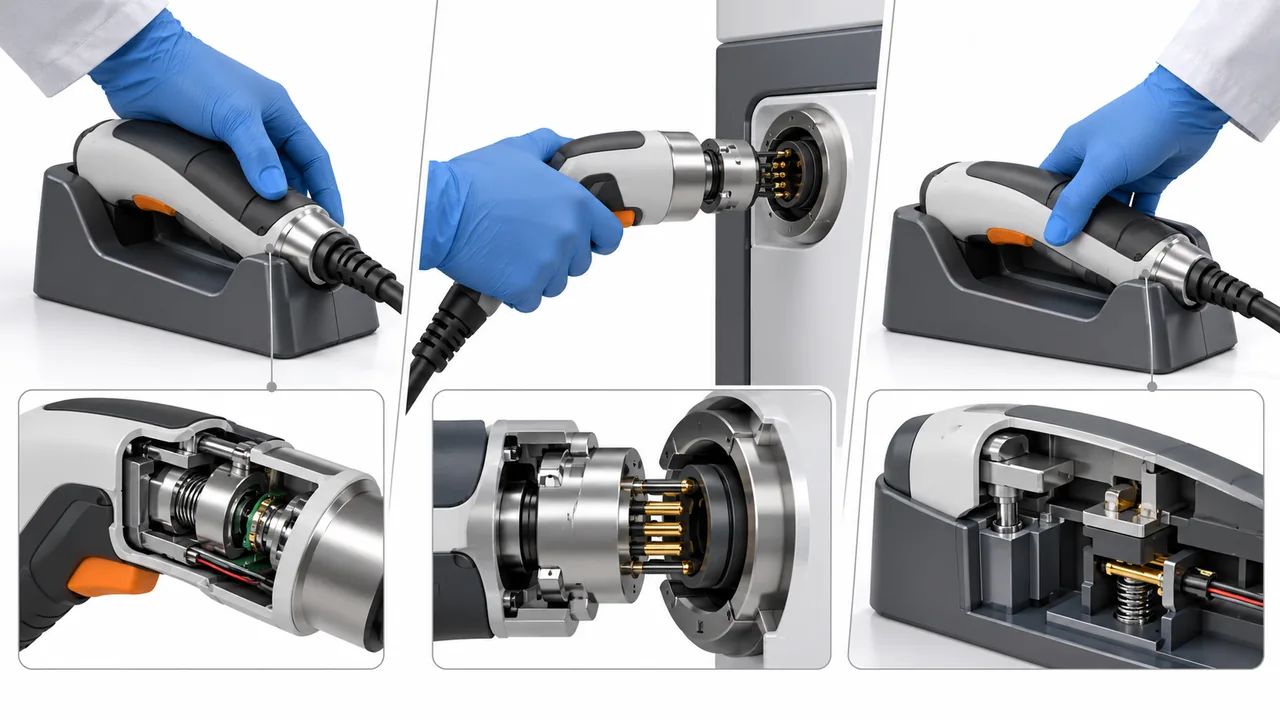
Define a representative task and watch the entire physical sequence. Where does the user pick up the device? Which hand stabilizes it? What must be connected, pressed, removed or returned to storage? Transitions can reveal problems that are absent when each control is reviewed in isolation.
Record intended users and the use environment. Gloved hands, wet surfaces, restricted visibility or a constrained workspace can change the practical interaction. Do not assume that a designer’s comfortable handling at a clean desk represents the intended context.
FDA human-factors guidance addresses intended users, uses and environments in reducing use-related risk. The manufacturing contribution is to create physical samples that let the responsible team investigate those interactions with suitable evidence.
Use the medical device design guidelines parent page for wider design considerations. The present review follows the user’s physical task and turns observations into component requirements.
Pickup: Let Geometry Establish Orientation

A symmetrical shape can be visually calm yet leave the user uncertain which end is active. Geometry, texture and the location of a grip can communicate orientation without relying entirely on labels. Evaluate whether these cues remain clear when the device is partly obscured or handled quickly.
Study center of mass as well as overall weight. A heavier internal component can make a seemingly balanced shell rotate in the hand. An empty printed model can reveal shape but not reproduce this behavior; add a justified mass representation when balance is the question.
Avoid assigning a universal grip diameter or surface texture. Users, tasks and handling conditions differ. Compare physical alternatives and record the reason a geometry works for the intended interaction rather than borrowing an ergonomic number from an unrelated product.
Operation: Put Force Where the Hand Can Support It

An actuation force may be acceptable in isolation yet awkward when the user cannot brace the device. Review the relationship between controls, grip and support surfaces. Consider whether pressing a button requires a simultaneous hand movement that destabilizes a connection.
Prototype controls with relevant travel and resistance when those properties affect the observation. A decorative button fixed to a visual model cannot answer a question about accidental activation or repetitive operation. State these limitations before interpreting the trial.
| Interface question | Useful physical model | Limitation to disclose |
|---|---|---|
| Can the user recognize orientation? | Shape and surface alternatives | A static model does not establish task performance alone |
| Is the device balanced during use? | Mass-representative assembly | A dummy mass may not reproduce every internal constraint |
| Is a control reachable and stable? | Representative travel and resistance | A printed mechanism may differ from production behavior |
| Can an accessory be connected correctly? | Actual or representative mating interface | Cosmetic plugs do not prove retention or sealing |
Utilisez prototyping services to distinguish appearance models from functionally representative samples. The best route depends on the interaction under investigation, not the desire to make every prototype look production-ready.
Connection: Remove Ambiguity Without Creating a New Trap

Accessory connections should be evaluated for alignment, engagement and removal. A keyed geometry may help orientation but can also create a thin feature or difficult internal corner. Review whether the cue is robust enough to survive manufacture and foreseeable handling.
Examine what the user can perceive when the connection is complete. A visible gap, tactile stop or controlled retention can contribute to feedback, but the appropriate solution depends on the device and task. Do not rely on a signal that disappears when the interface is hidden by a hand.
Where assembly requires force, evaluate how that force travels through the housing. A delicate panel may be loaded during insertion even if it carries little load during normal operation. The industrial design and structural design should agree on which surfaces provide support.
For a metal structure, usinage CNC can provide representative interfaces. For a future molded housing, identify which prototype observations can transfer and which require molded samples, particularly around snaps, thin walls and textured surfaces.
Cleaning: Make the Physical Boundary Visible

Review seams, recesses, grips, connector openings and removable parts. A deep groove can improve grip but may complicate cleaning; a decorative seam can create an inaccessible interface. The team needs a deliberate balance based on the device’s cleaning requirements.
Do not claim that a smooth surface is automatically cleanable or that a sealed housing requires no evaluation. Surface condition, material, geometry and the defined method all matter. The responsible specialists should establish the cleaning instructions and evidence appropriate to the device.
Investigate whether a user can identify which components detach and how they return to the correct position. A removable cover that solves access can introduce assembly ambiguity, loss of a seal or an additional small part. Evaluate the full task after changing the cleaning interface.
Choose representative surface models where texture or finish matters. A rough printed housing can exaggerate friction or retain residue differently from a molded surface. Conversely, a painted appearance model may hide a seam that remains present in production.
Manufacturing: Keep the Useful Form, Remove the Fragile Detail

Bring the selected concept into a manufacturing review before its visual details become untouchable. Draft, wall transitions, ribs, parting lines and fastening can influence the form users experience. Explain the intended interaction so manufacturing changes preserve it.
The existing medical device DFM article addresses broader geometry and production considerations. Here, use DFM to protect the physical interface: keep a helpful grip cue while making it moldable, or relocate a parting line away from a sensitive hand-contact region.
Document the final design intent in measurable terms where possible. A drawing that says comfortable is difficult to inspect. A controlled geometry, surface requirement and justified evaluation provide a clearer release basis while recognizing that user interaction cannot be reduced to a single dimension.
For a Jucheng review, supply the prototype’s purpose, material assumptions, relevant user-interface surfaces and intended fabrication route. Confirm which physical samples can be made and what each will represent. Industrial design gains value when it connects observed use with a reproducible component, not when it remains a rendering detached from manufacturing.
Do Appearance Models Still Have Value?
Yes, when the question concerns form, orientation or visual communication and the limitations are stated. They should not be interpreted as evidence of production mechanical performance or complete usability validation.
Should Every User Preference Become a Drawing Change?
No. Relate observations to the intended task, relevant risks and design requirements. Distinguish personal preferences from repeated or consequential difficulties, and assess whether a proposed change creates a new manufacturing or interface problem.